Sunday, August 12, 2018

Oracle Audit Vault Installation on VMware


Oracle Audit Vault Installation on VMware


Summery:

1.    Media Download
2.    Prerequisites
3.    Installation Audit Vault 12.2.0.8
4.    Post Installation

We are Going to install Oracle Audit Vault Database Firewall 12.2.0.8
1.    Media Download
Ø  open a web browser.
Ø  Type https://edelivery.oracle.com/ in the address bar.
Ø   Click on "Sign In
Ø  Type Audit Vault and Database firewall


1.   Prerequisites:

Ø  Windows 64 bit
Ø  VMware installed
Ø  At least 8GB memory
Ø  Hard Disk Drive 450 GB HDD
Ø  Host machine should be access guest machine

2.   Installation Audit Vault 12.2.0.8

Ø  Open VMware workstation
Ø  Select File > New Virtual Machine


Image: 02
Click Next

Image: 03
Chose I will install the operating system later

Image: 04
Select Operating system type
Click Next


Image: 05
Specify the Virtual Machine Name and Location


Image: 06

Specify Disk Size:                           450
Store virtual disk as a single file:    will be easy to move

Ø  Brows to insert disk1.iso file (V978697-01.iso)

Image: 07
Click Close

Ø  Select First option as below using Arrow keys:

Image: 08
Press Enter

Image: 9
Wait until Packages installed it will take time

Image: 10

Image: 11

Installation will be continuing after that will be popup for disk 2

Ø  Insert/Mount media disk2 (V978698-01.iso) As Image: 07

Image: 12
Click Enter / OK

Ø  After taking time will popup “PLEASE insert disk 3”
Ø  To insert / Mount disk 3 please follow step image: 12 > 07 
ð  Click OK
Ø  After taking time to disk 3 it will again popup for Disk 1 to complete the installation “PLEASE insert disk 1”

Image: 13

To insert / Mount disk 1 please follow step image: 12 > 07
Click OK
After that installation will be complete

Ø  Please Enter Installation Password what you want 


Image: 14
Click ok

Ø  Select interface 

Image: 15
Select > Press Enter

Image: 16
Select > Press Enter

Ø  Enter IP Address which you have decided 


 Image: 17


Image: 18
Rebooting to complete installation

4.     Post Installation

Login to Audit Vault Web Console

Ø  Open a web browser and enter following url
Ø  Press "<Enter>" key to go to the specified url.
Ø  Click on "Proceed Anyway" button.
Ø  Enter Installation Passphrase


ð  Enter Installation Passphrase.
ð  Click on "Login" button.

Image: 19
Click LOGIN

Ø  User Configuration

ð  Enter username and password for the users to be configured.
ð  User Setup:
Users AVADMIN and AVAUDIT are created in Oracle database.
ð  User root and "support" are created in operating system. While connecting to the audit vault server using terminals like ssh and putty, first login as support user then switch to other users. User "oracle" is implicitly created in the operating system.

Image: 20
Click SAVE

Ø  Login to Audit Vault console

ð  After Click Save button, automatically redirect to Login page.
ð  Login as AVADMIN user. Provide the username and password.
ð  Click on Login button.

Image: 21
Enter User Name
Password
Click Login

Ø  Audit Vault Home page


Image: 22


Database Firewall Installation on VMware
https://dbafield.blogspot.com/2018/08/database-firewall-installation-on-vmware.html


References: 
Oracle® Audit Vault and Database Firewall Installation Guide
Release 12.2.0.8


Keep Smile 😊


Monday, July 30, 2018

Database Vault Setup and Configuration

Database Vault Setup and Configuration


Summery:
1.    Pre check
2.    Stop Services
3.    Enable Database Vault link product
4.    Database Vault Installation / configuration with dbca
5.    Database Vault Console Login
Disable Database Vault


1.   Pre-check Database Vault Configurations
Normally Database Vault should not be installed, and you can confirm it like:
 SQL > SELECT * FROM V$OPTION WHERE PARAMETER = 'Oracle Database Vault';
 PARAMETERS                                           VALUE
 -----------------------------------------------------------------
 Oracle Database Value                             FALSE

The make command enables both Oracle Database Vault and Oracle Label Security.
You must enable Oracle Label Security before you can use Database Vault.

Ø  Oracle Label Security

 SQL > SELECT * FROM V$OPTION WHERE PARAMETER = 'Oracle Label Security';
 PARAMETERS                                           VALUE
 -----------------------------------------------------------------
 Oracle Label Security                                 FALSE


2.    Stop Services
Ø  To install it Stop listener, Stop listener, Stop database, Stop database console


$ lsnrctl stop listener_name
 $ sqlplus / as sysdba
 SQL> shu immediate
 $emctl stop dbconsole


$emctl stop dbconsole: if you have already configured otherwise you may skip this in my case I don’t have Oracle Enterprise Express / manager, so I will install EM along with DV
 
3.   Enable Database Vault Link Product

Enable Database Vault link product with following commands
ð  Make sure all services stopped then proceed following  
$ cd $ORACLE_HOME/rdbms/lib
$ make -f ins_rdbms.mk dv_on lbac_on ioracle

 $ sqlplus  / as sysdba
 Enter password: password
 SQL> STARTUP
 SQL> EXIT
 $ lsnrctl start [listener_name]

4.   Database Vault Installation / configuration with $ dbca

ð  Make sure you have an entry in /etc/oratab for your database unless option are not accessible.
ð  Please check “Database Vault and label parameter it will be true now After linking” to check please follow Step#1
ð  Login database machine from oracle user and run
ð  $ dbca


 Image: 01
Select on Configure Database Option
click Next

Image: 02
Click on Database on which you want to Configure
In my case just have one database named "dbvault'
Click Next

Image: 03

If you have already Configured Enterprise manager  then unchecked 
Click Next 
Image: 04
Click Next 


  • Enter User name for Database Vault Owner 
  •  Like: DVOWNER and DVMGR. In my case is dvo and dva
  • Enter password for both user 
  • Click Next

Image: 05

Image: 06
Click Next

Image: 07
Click Next

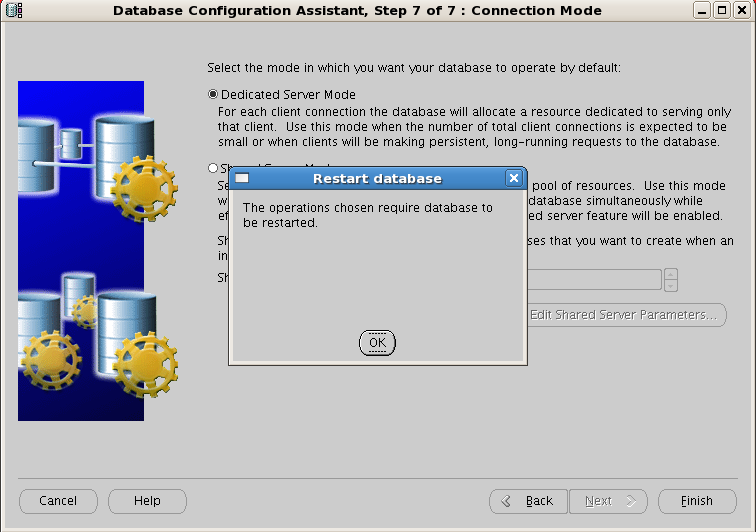
Image: 08
click OK

Image: 09
click OK

Image: 10
Waiting until complete
Image: 11
Click Yes

1.   Database Vault Console Login
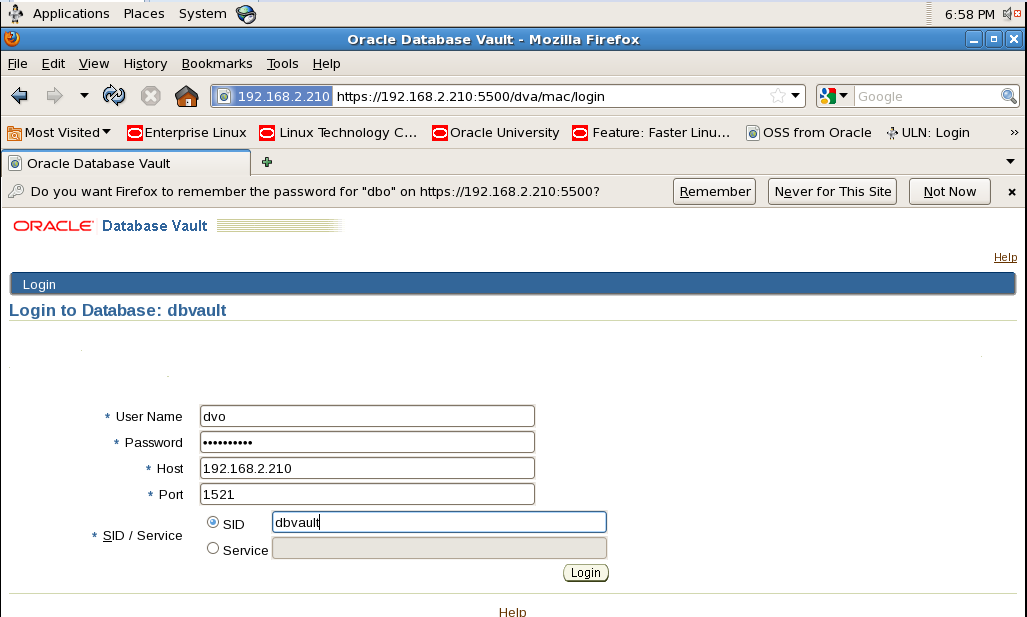
ð  Open Browser
ð  Type or past url
ð  https://192.168.2.210:5500/em      => Enterprise Express
ð  https://192.168.2.210:5500/dva     => Database Vault
ð  Enter user name dvo

Image: 12
Console
DVA => DVOWNER User
DVA => DVACCOUNTMANAGER


Ø  Home Page

Image: 13
Admin Page


1.   Disable Database Vault
To disable Database Vault the same thing but you should Follow:

ð  Stop listener
ð  Shutdown database
ð  Stop dbconsole

$ cd $ORACLE_HOME/rdbms/lib
$ make -f ins_rdbms.mk dv_off lbac_off ioracle

For More detail you may Visit Oracle Documentation

Thank you

Enable or disable Unified audit in Oracle Database


Enable or disable Unified audit in Oracle

Summery:


  1. Enable Unified Audit in Oracle Database
  2. Disable Unified Audit in Oracle Database  


Enable the Unified Audit in Oracle Database

1. Check the unified audit is disable.


select parameter,value from v$option where parameter = 'Unified Auditing';        


PARAMETER              VALUE                                                   
-------------------- ----------                                                 
Unified Auditing       TRUE                                                       


2. Shutdown and stop all the services related to Oracle Binaries.

$ sqlplus / as sysdba                                                         
SQL> shutdown immediate                                                       
SQL> exit                                                                        
$ lsnrctl stop                                                                            

 > If OEM is configured

$ cd /u01/app/oracle/product/middleware/oms
export OMS_HOME=/u01/app/oracle/product/middleware/oms
$OMS_HOME/bin/emctl stop oms

3. Enable the Unified auditing from Oracle Binaries.

cd $ORACLE_HOME/rdbms/lib                                                     
make -f ins_rdbms.mk uniaud_on ioracle                                          

4. Start the database

SQL> Startup                                                                     
$ lsnrctl start                                                                           
$ emctl start oms                                                                

5. Check the auditing is enabled

select parameter,value from v$option where parameter = 'Unified Auditing';        


PARAMETER              VALUE                                                   
-------------------- ----------                                                 
Unified Auditing       TRUE                                                       


Disable Unified audit in Oracle Database

1. Check Unified auditing is enabled.

select parameter,value from v$option where parameter = 'Unified Auditing';        
PARAMETER              VALUE                                                   
-------------------- ----------                                                 
Unified Auditing       TRUE                                                       

2. Checked the enabled policies present in Oracle Database.

select user_name,policy_name,enabled_opt,success,failure from                      audit_unified_enabled_policies;                                                 

3. Disable that enabled policies by running output of the following query.

SQL> select 'noaudit policy '||policy_name||';' from audit_unified_enabled_policies;

4. Shutdown and stop all releated oracle Services.

$ sqlplus / as sysdba                                                             
SQL> shutdown immediate                                                           
SQL exit                                                                             
$ lsnrctl stop                                                                                

cd /u01/app/oracle/product/middleware/oms                                           
export OMS_HOME=/u01/app/oracle/product/middleware/oms                             
$OMS_HOME/bin/emctl stop oms                                                          

5. Disable the unified audit with libraries from Oracle Binaries.

cd $ORACLE_HOME/rdbms/lib                                                           
make -f ins_rdbms.mk uniaud_off ioracle                                             

6. Start the database

SQ> Startup
$ lsnrctl start
$ emctl start oms

7. Verify the unified audit disable

select parameter,value from v$option where parameter = 'Unified Auditing';               
PARAMETER             VALUE                                                           
-------------------- ----------                                                       
Unified Auditing      FALSE                                                              


Oracle Golden Gate 21c Microservices Installation

Oracle Golden Gate Microservices Architecture Oracle Golden Gate Microservices Architecture has been introduced in Oracle Golden Gate versio...